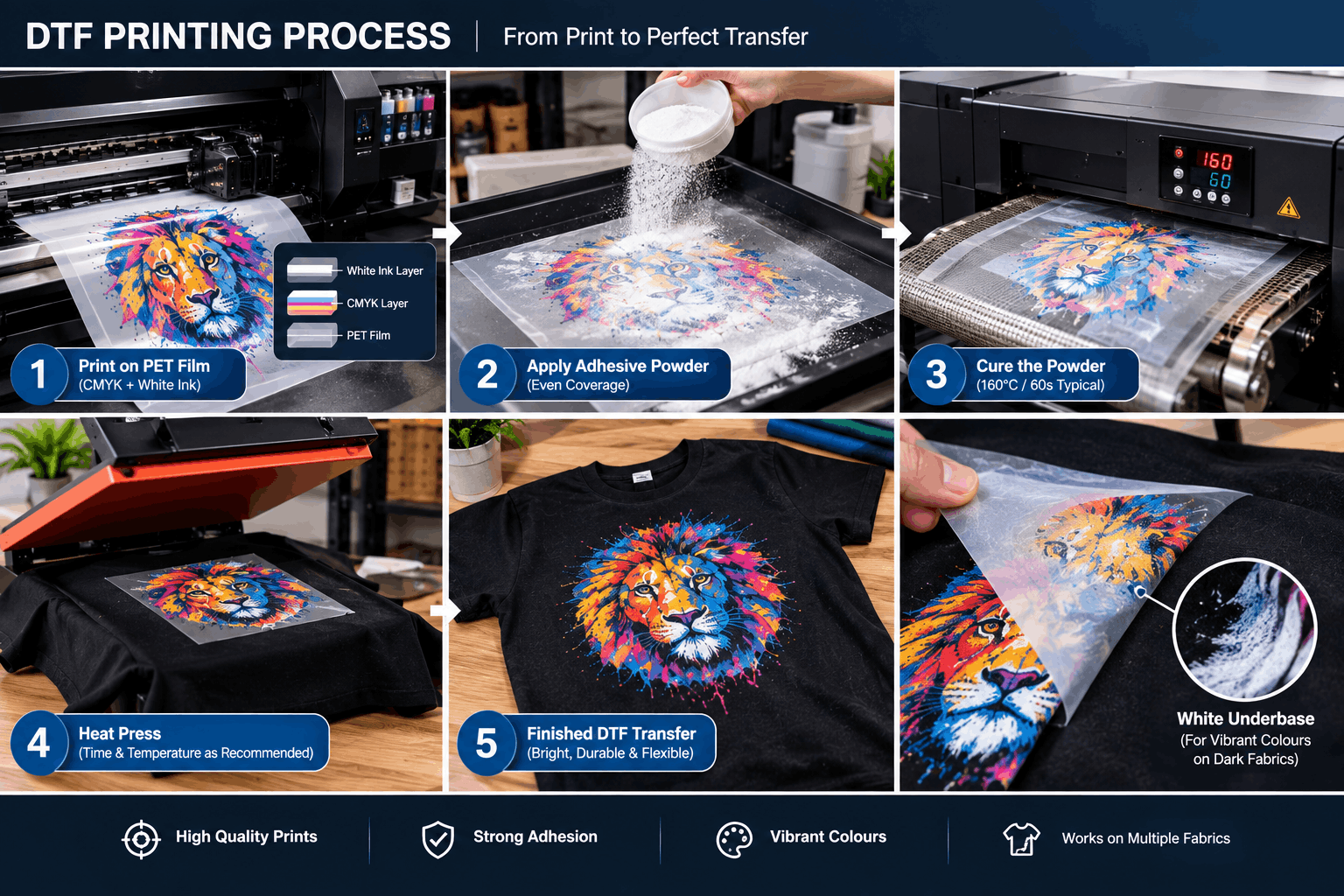
DTF adhesive powder, PET film, and DTF ink work together to create a transferable design that can bond to fabric. The PET film temporarily carries the printed image. Colour and white inks create the artwork, while adhesive powder coats the printed area. After curing, heat and pressure bond the prepared design to the garment.
Each material has a different role. If one part of the process is poorly matched or incorrectly handled, the finished transfer can suffer.
What Role Does PET Film Play in DTF Printing?
PET film acts as the temporary surface on which a DTF design is created.
Unlike direct-to-garment printing, DTF does not initially print the artwork onto the clothing. Instead, the printer deposits ink onto a specially prepared film.
The film must hold the ink correctly during printing. It must also tolerate powder application, curing, heat pressing, and the final peeling stage.
Its surface characteristics are therefore important.
Ordinary plastic film is not a substitute for film designed for DTF production. Suitable PET transfer film is manufactured to work with the ink and transfer process.
How Does DTF Ink Build the Printed Design?
The printing stage normally combines colour ink with white ink.
CMYK inks create the visible colours in the artwork. The printer then uses white ink to form an opaque backing layer where required.
This white underbase is particularly useful for transfers intended for dark or coloured garments. Without enough opacity behind the colour layer, the fabric colour could influence the appearance of the design.
A DTF transfer printer handles this first production stage by placing the required colour and white ink layers onto the PET film. The printed film then continues through powdering, curing, and heat pressing before the design reaches the garment.
The printer and consumables therefore operate as parts of one connected transfer process.
What Does DTF Adhesive Powder Do?
DTF adhesive powder creates the bonding layer between the printed design and the textile.
After the artwork has been printed onto PET film, the powder is applied to the appropriate inked surface. It adheres to the printed areas while loose excess powder is removed.
The powdered film is then cured.
During curing, the adhesive is prepared for the later heat-transfer stage. When the transfer is pressed onto the garment, the adhesive helps secure the printed design to the fabric.
Without a suitable adhesive layer, the ink itself does not provide the complete fabric-bonding system required for a normal DTF transfer.
Why Must the Powder Be Applied Evenly?
Consistent powder coverage helps create a consistent bonding layer.
If sections of a design receive inadequate adhesive, transfer performance can become uneven. Excess material outside the printed design can also create an untidy result.
The aim is not simply to use as much powder as possible.
Instead, the printed area needs appropriate and even coverage according to the materials and process being used.
For manual workflows, operators need to handle the film carefully during this stage. More automated production systems may use dedicated powdering equipment.
In either case, the powder should be compatible with the chosen ink, film, curing process, and intended application.
How Does Curing Connect Ink and Adhesive?
Curing prepares the powdered transfer for application.
After the adhesive powder has coated the printed design, controlled heat is used according to the transfer system’s requirements.
This stage is important because the transfer must be prepared correctly before it is pressed onto fabric.
Curing should not be confused with final heat pressing. They are separate parts of the workflow.
Curing prepares the printed and powdered transfer.
Heat pressing applies that prepared transfer to the garment.
Beginners sometimes focus heavily on printing while overlooking curing. However, a well-printed film still needs correct downstream processing to become a usable transfer.
How Does the Transfer Finally Stick to Fabric?
The prepared transfer is positioned on the garment and placed under a heat press.
Heat and pressure activate the transfer process and allow the adhesive layer to bond with the textile surface.
The PET film remains the carrier during this stage. It is removed according to the procedure required by the specific film and transfer system.
The result leaves the printed design on the garment rather than on the original PET carrier.
This explains why DTF should be understood as a multi-stage transfer method. The printer creates the design, but film, adhesive, curing, and pressing complete the process.
Why Does the White Underbase Matter?
The white ink layer has both visual and structural importance within the printed transfer.
Its most obvious role is opacity.
Suppose a design contains yellow, red, and blue elements and will be applied to a black shirt. A suitable white layer creates a light foundation behind those colours.
This helps prevent the dark textile from visually interfering with the design.
The white layer also forms part of the printed surface that interacts with the adhesive powder during transfer preparation.
Therefore, reliable white ink output is important throughout the process.
Can You Mix Any Film, Ink and Powder?
Not every combination should be assumed to work equally well.
DTF film, ink, and adhesive powder have their own characteristics. Their behaviour can also depend on curing and pressing conditions.
For that reason, compatibility matters.
When changing one major consumable, test the complete workflow before using the new combination for customer production.
A useful test should examine more than initial appearance. Check whether the design transfers cleanly and whether the garment remains suitable after the application process.
Follow the relevant supplier instructions for curing, pressing, peeling, storage, and handling.
What Can Go Wrong During the Process?
Problems can appear at different stages, so it helps to identify where a defect begins.
If the printed artwork looks wrong before powdering, investigate the printing stage first. Possible areas to check include artwork preparation, RIP settings, ink flow, or printhead condition.
If powder coverage appears uneven, review the powdering process and material compatibility.
If the transfer looks correct before pressing but does not apply properly, investigate curing, heat-press conditions, garment compatibility, and the required peel procedure.
Changing several variables at once makes troubleshooting harder.
Instead, inspect the workflow in sequence:
Film → printing → powder → curing → pressing → peeling
This approach makes it easier to identify the stage that needs attention.
Why Should Beginners Understand the Whole Transfer System?
DTF printing works best when users stop thinking of the printer, film, ink, and powder as unrelated products.
They form a connected production chain.
The PET film provides the temporary carrier. Colour and white inks build the image. DTF adhesive powder creates the bonding layer. Curing prepares the transfer, and the heat press completes its application to the garment.
Understanding these relationships also makes equipment and consumable choices easier.
Instead of asking whether one product is good in isolation, users can ask whether the complete combination is suitable for their workflow.
A Reliable DTF Transfer Depends on Every Stage
A successful DTF transfer is created through several linked steps rather than a single printing action.
PET film carries the artwork through production. DTF ink creates the colour and white layers. Adhesive powder provides the bond needed for textile application. Curing prepares that adhesive, while heat and pressure complete the transfer.
For consistent production, each component should be compatible with the others and handled according to its intended process. Treating film, ink, powder, curing, and pressing as one coordinated workflow makes it easier to produce repeatable DTF transfers and troubleshoot problems when they occur.